storm@gentoo /opt/chem/apps/molclus-1.14 $ cat cluster.xyz
          16
 Energy =    -21.09757159 a.u.  #Cluster:    1
C          -0.14198444      1.65212712     -0.38118925
C           1.09751952      1.19810333     -0.51995646
C           1.70522774      0.11499717      0.25914429
C           1.25677611     -1.13195992      0.33477307
C           0.07043023     -1.65844827     -0.34701784
C          -1.16911928     -1.20449212     -0.20848744
C          -1.58271288     -0.09194827      0.65207512
C          -1.13422967      1.15504415      0.57680601
H          -1.56217824      1.91671453      1.21949431
H          -0.46631267      2.50750649     -0.96394089
H           1.77154000      1.68776438     -1.21445743
H           2.63573744      0.37910676      0.75001139
H           1.82557367     -1.87205053      0.88680483
H           0.25331915     -2.53524729     -0.95873884
H          -1.98458606     -1.71561044     -0.70865718
H          -2.37194786     -0.33449507      1.35541818
          16
 Energy =    -21.06002401 a.u.  #Cluster:    2
C           0.00000000      1.82221863      0.00000000
C           1.28850059      1.28850059      0.00000000
C           1.82221863      0.00000000      0.00000000
C           1.28850059     -1.28850059      0.00000000
C           0.00000000     -1.82221863      0.00000000
C          -1.28850059     -1.28850059      0.00000000
C          -1.82221863      0.00000000      0.00000000
C          -1.28850059      1.28850059      0.00000000
H          -2.05568448      2.05568448      0.00000000
H           0.00000000      2.90718024      0.00000000
H           2.05568448      2.05568448      0.00000000
H           2.90718024      0.00000000      0.00000000
H           2.05568448     -2.05568448      0.00000000
H           0.00000000     -2.90718024      0.00000000
H          -2.05568448     -2.05568448      0.00000000
H          -2.90718024      0.00000000      0.00000000
gentoo /opt/chem/apps/molclus-1.14 # ./molclus |tee out.txt
 Molclus: A flexible program for searching cluster configurations and molecular conformations
 Official website: http://www.keinsci.com/research/molclus.html
 Developed by Tian Lu ([email protected])     Last update: 2026-Apr-1
 Beijing Kein Research Center for Natural Sciences (http://www.keinsci.com)
 P-L-E-A-S-E properly cite this code as mentioned in the official site

 Inputted trajectory file: traj.xyz
 Loading basic information from the inputted trajectory file ...
 There are totally         2 geometries in the inputted trajectory file

 Setting file: settings.ini
 Loading setting file ...
 Program to be invoked: Gaussian
 Task: Optimization + Frequency
 All frames in the inputted trajectory file will be processed

 Cleaning old output and temporary files...
 Deleting *.out *.chk gauSP*
 All Gaussian temporary files in current folder have been cleaned

                         *** Configuration     1  ***
 Current date: 2026-04-27   Time: 08:40:07
 Loading geometry         1 from the inputted trajectory file
 Generating gau.gjf...
 Running Gaussian: "/opt/chem/apps/g16/g16" < gau.gjf > gau.out
 Fine, optimization normally converged
 Opt + freq task normally terminated
 Thermal correction to Gibbs free energy:    0.101709 a.u.
 Gibbs free energy:     -309.291706 a.u.
 Fine, there is no imaginary frequency
 Now run single point task based on the template_SP.inp in current folder
 Running ORCA: "/opt/chem/apps/orca611/orca" orcaSP.inp  > orcaSP.out
 Single point energy:     -309.488540 Hartree
 Deleting orcaSP.* orcaSP_*
 Single point calculation normally terminated. The sum of the new single point energy and thermal correction to Gibbs free energy is     -309.386831 a.u.
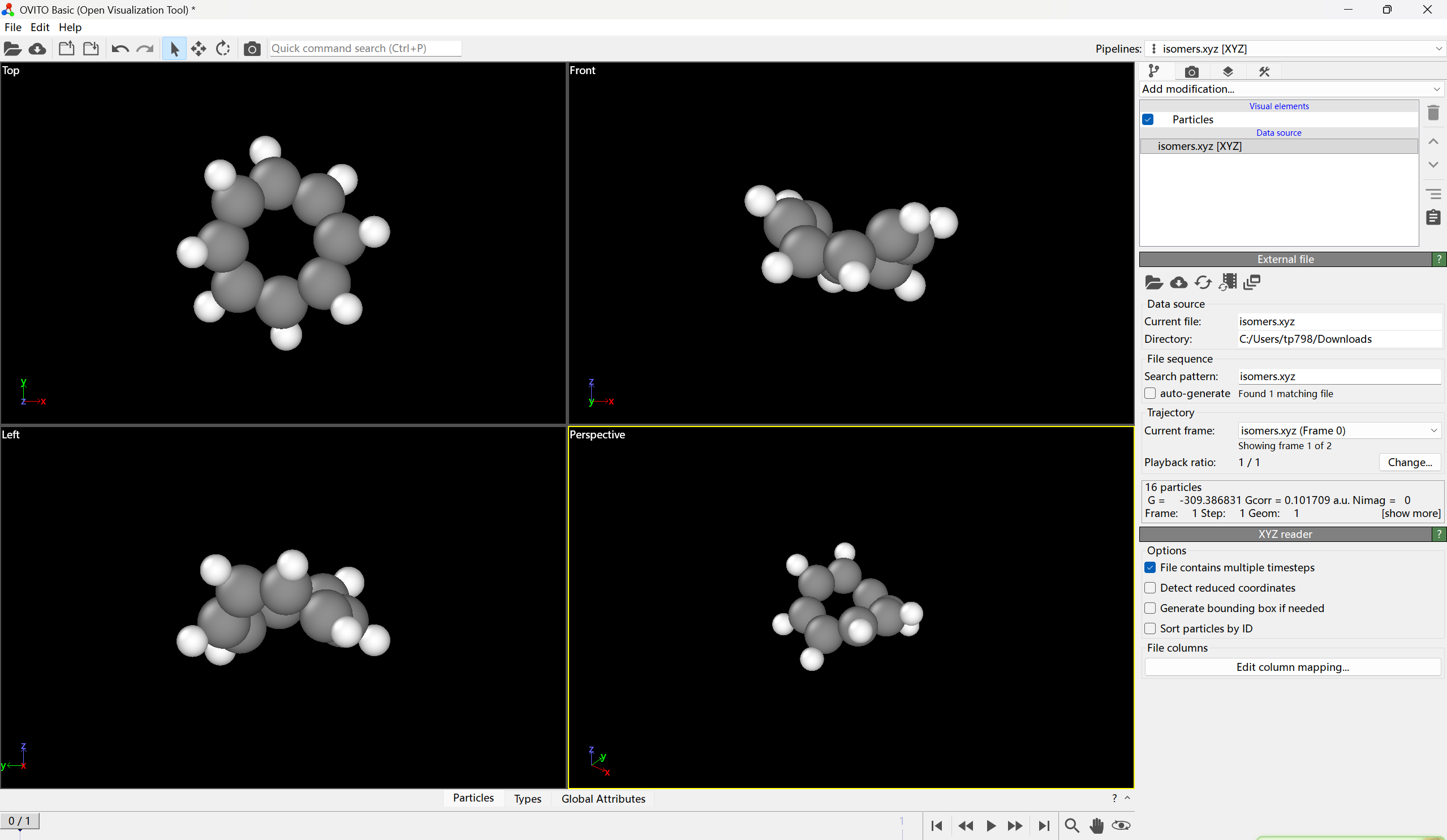
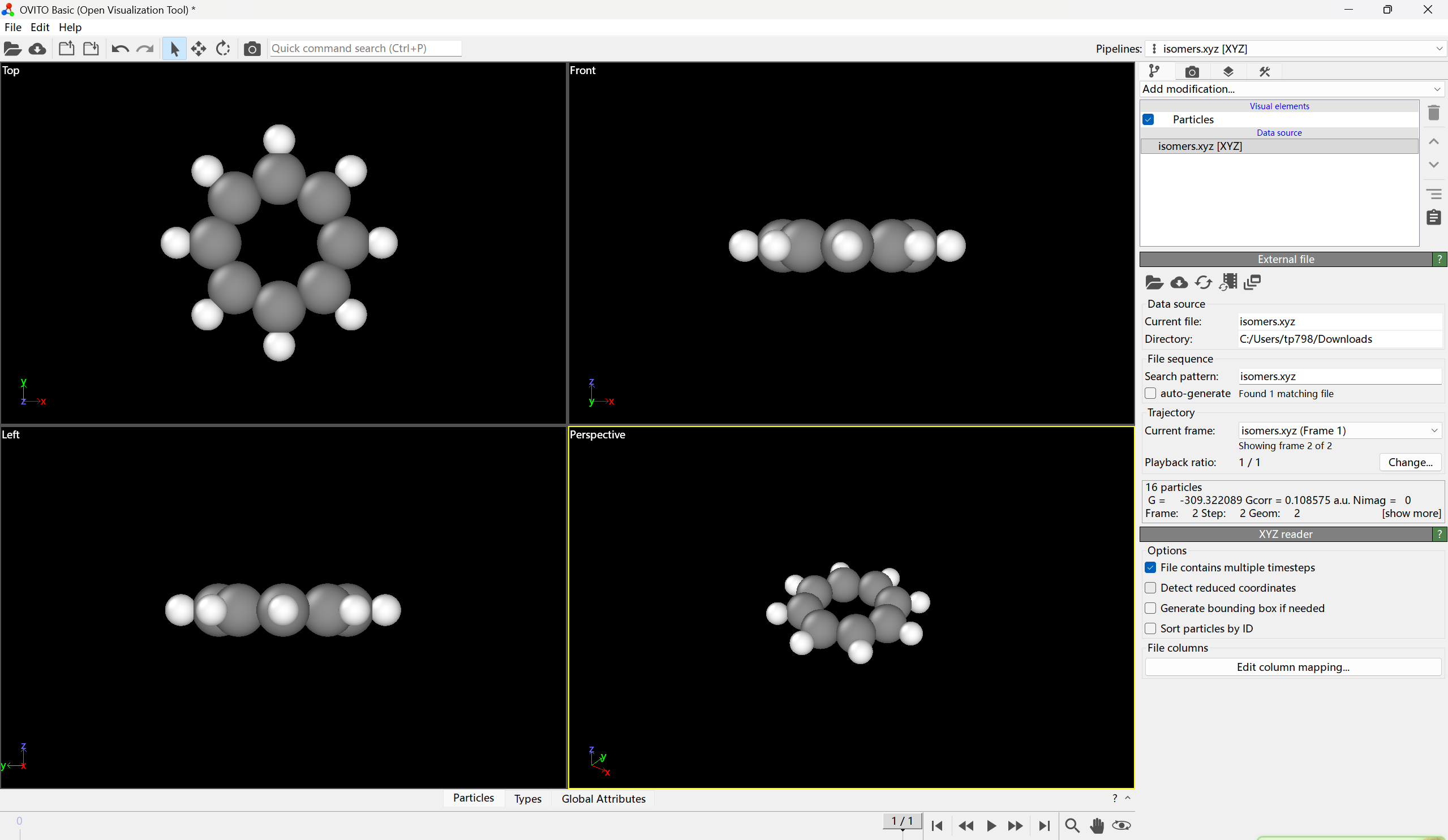
 Writing the converged geometry, free energy and so on to isomers.xyz
 Wall clock time elapsed for calculating this configuration:     179 s

                         *** Configuration     2  ***
 Current date: 2026-04-27   Time: 08:43:06
 Loading geometry         2 from the inputted trajectory file
 Generating gau.gjf...
 Running Gaussian: "/opt/chem/apps/g16/g16" < gau.gjf > gau.out
 Fine, optimization normally converged
 Opt + freq task normally terminated
 Thermal correction to Gibbs free energy:    0.108575 a.u.
 Gibbs free energy:     -309.237477 a.u.
 Fine, there is no imaginary frequency
 Now run single point task based on the template_SP.inp in current folder
 Running ORCA: "/opt/chem/apps/orca611/orca" orcaSP.inp  > orcaSP.out
 Single point energy:     -309.430664 Hartree
 Deleting orcaSP.* orcaSP_*
 Single point calculation normally terminated. The sum of the new single point energy and thermal correction to Gibbs free energy is     -309.322089 a.u.
 Writing the converged geometry, free energy and so on to isomers.xyz
 Wall clock time elapsed for calculating this configuration:     120 s

 Deleting gau.gjf gau.out gau.chk

 Running finished!
 All calculations totally took up wall clock time       299 s (   0.08 hours)

 Gibbs free energy (G), thermal correction to G (Gcorr), numbers of imaginary frequencies (Nimag) and geometry of all successful configurations have been collectively outputted to isomers.xyz in current folder.
 In this file, the value after "Frame:" is the frame index in the isomers.xyz, "Step:" is the step number in this time of molclus execution, "Geom:" is geometry index in the inputted trajectory file
gentoo /opt/chem/apps/molclus-1.14 # ./isostat
 Isostat: A statistical analysis tool for a batch of isomers (64 bit)
 Released as a component of Molclus, last update of isostat: 2022-May-28
 Developed by Tian Lu, contact: [email protected]
 Beijing Kein Research Center for Natural Sciences (http://www.keinsci.com)

 Number of CPU cores to be used:   12

 Input the path of input file, e.g. C:\sob\lovelive\nico.xyz
 If press ENTER button directly, isomers.xyz in current folder will be loaded
   To change number of cores used in calculation, input value now, e.g. 18


 Input the energy threshold for distinguishing different clusters
 e.g. 0.5  (in kcal/mol)
 If press ENTER button directly, 0.25 kcal/mol will be used


 Input the geometry threshold for distinguishing different clusters
 e.g. 0.25  (in Angstrom)
 If press ENTER button directly, 0.1 Angstrom will be used


 Analyzing...

 There are    16 atoms
 There are     2 isomers

 Energy of isomer     1 :   -309.38683100 a.u.,  new cluster
 Energy of isomer     2 :   -309.32208900 a.u.,  new cluster

 The lowest energy is   -309.38683100 a.u.

 Nimag information was found, no isomer has imaginary frequency

 Sorting clusters according to energy...
 Calculation took up wall clock time         0 s

 In below output, DE is energy difference with respect to the lowest one. DGmin quantifies minimal geometry difference with respect to all other clusters

 #    1 Count:    1  E=   -309.386831 a.u.  DGmin=   0.68  DE=    0.00 kcal/mol
 #    2 Count:    1  E=   -309.322089 a.u.  DGmin=   0.68  DE=   40.63 kcal/mol

 Representative geometry of each cluster along with their energies have been outputted to cluster.xyz in current folder

 If you want to calculate Boltzmann distribution, input temperature in K
 If you want to exit, directly press ENTER button
300
 #    1   Count:   1   Ratio: 100.00%
 #    2   Count:   1   Ratio:   0.00%
 Press ENTER button to exit